
Knowledgebase
 Suchen Sie Ihre Frage?
- FAQ: Meine Bestellungen
- Mein Konto FAQ
- Zahlungsweise: Fragen & Antworten
- Internationaler Versand Fragen & Antworten
- FAQs zu Rücksendungen & Rückerstattungen
- Meine Treuepunkte: Fragen & Antworten
- FAQ's für Hochzeitskleider & Kleider für Anlässe (Massgeschneidert)
- Neue Benutzer--Anleitung
- Fehlerbehandlung
- Wie Es Zu Bezahlen
- Versand & Lieferung
- Kundenservice
- Produkt Hilfe
- FAQs
- Über LightInTheBox Ltd
- Wie Funktioniert Direktversand bei LightIntheBox.com
- Steuer, Zollgebühren
- Garantie & Gewährleistung
- Ihren Auftrag Prüfen
- Kann Ich Extra Diskonte Bekommen
- Nutzungsbedingung in LightInTheBox
- Auto Zubehör FAQ
- Sonder Versandhinweise
- Meine Vergütung & Gutschriften FAQ
LightInTheBox Groothandelaar Gids
Whether you're looking to start out in the wholesale business or an experienced wholesaler new to LightInTheBox.com, this convenient guide to buying wholesale is the best place to start.
If you have any problems when following these steps, please view our Knowledgebase help center for more tips.
Go to the Wholesale Homepage
On this page:
- 1. Register for Free
- 2. Browse Wholesale
- 3. Add to Cart
- 4. Checkout Your Items
- 5. Add Shipping Address
- 6. Choose Payment and Delivery Details
- 7. Check Order Status
- 8. Wholesale Searching Tips
Register for Free
Registering as a wholesaler at LightInTheBox is completely free; all you need to start with is an email address.
(i) Click the Register link at the top right of every page on LightInTheBox.com. You will be taken to the Login and Registration page.
(ii) Fill in your details under New Guests on the right of the page.
Note: the email address you enter will be the only email we can use to send you important information about your orders
(iii) Check the I agree to LightInTheBox's Terms and Conditions box, then click the Create New Account button to continue.
That's it! With your new LightInTheBox Wholesalers Account you will be able to browse the site, add items to your Shopping Cart, get free help from our Customer Service staff, and get great discounts on bulk orders. After creating your account, you will be taken to the Your Orders page, which will be empty. To fill it up, start browsing LightInTheBox.com.
Special VIP Membership for Wholesalers
Especially for retailers, wholesalers, and dropshippers, we offer a VIP Business Membership which provides you with a dedicated account manager who will search out the best wholesale deals for you, and inform you of any changes in pricing or stock.
For more details, click here
Browse Wholesale
From the home page, there are a number of ways you can begin to search out the products you're looking for:
l Search by Category: To browse products in a specific area of interest, use the category list on the left to narrow down our catalog and browse pages with products and deals catered for you. Click on See All Categories to view our complete catalog index
l Search by Keyword: If you have a particular product in mind, type the product, brand-name, or special function you're looking for into the Search box at the top of the home page and click Go. You will then be given a list of products that match your searched word(s) with brief description and link to the product page. A product Search box can also be found on almost every page on LightInTheBox.com.
Filtering Your Results
The list of products returned can also be filtered to display products specially for wholesalers. At the top of the search results page, click Wholesale Only. You can also click Free Shipping to return products that have no shipping costs; a very useful deal for wholesalers.
l Search by Deals: LightInTheBox.com always displays the latest deals, special promotions, and on sale items in banners on our home page. Click on any banners that interest you to be taken to a product or category page with more details.
l Click the Wholesale Tab: To browse for deals specially chosen for wholesalers, select the Wholesale tab at the top of the homepage and most other pages on LightInTheBox.com. The latest deals for wholesalers and other products suited to wholesale are shown here.
Click on individual item pictures or titles to see its product detail page. Here you can see an item's picture(s), specifications, and price per unit. Unless otherwise stated, any item you can see is in stock.
Add to Cart
When you find an item you like, click the Add To Cart button  to save it for later purchase. You will be taken to your Shopping Cart where you will find a list of all the items you've added and a subtotal.
You can also access your Shopping Cart at any time by clicking the Cart  at the top of every page on LightInTheBox.com.
On the Shopping Cart page, you can:
l Change the item quantity of individual products added to your cart.
l Remove any unwanted items by clicking Delete  .
.
l View shipping costs at the bottom of the page, under Estimate Shipping Costs. Select the country you want your items delivered to and then enter the number you want in the Qty box next to the item name to get the best shipping estimate. See our page on shipping methods for more details.
l Look for more items by clicking Continue Shopping  .
.
l Go on to the next stage of the ordering process and checkout your items.
Checkout Your Items
When you decide to order the items in your shopping cart, you have three options, depending on how you want to pay:
1. To pay by Wire Transfer or Western Union, click the Continue Checkout button  .
.
2. To pay with PayPal (includes Credit Cards payments), click the Check out with PayPal button  .
.
3. To pay with Google Checkout (includes Credit Cards, Debit Cards, and Gift Vouchers payments), click the Google Checkout button  . Note: Google Checkout is only available on certain items (see Payment Methods for more details).
If you choose to pay through PayPal or Google Checkout, you can now proceed to the final step: Check Order Status.
If you click Proceed to Checkout, you are ready to go onto the Add a Shipping Address step.
Add Shipping Address
You will be now taken to your Address Book where you can tell us your Shipping Address and Billing Address. The Shipping Address is the place you want us to ship your order, and the Billing Address is the address that appears on your credit card statements.
Please take the time to fill in your shipping and billing address as fully as possible to ensure the safe and quick delivery of your order. The red star (*) indicates required information, but the more details you add, the better.
If your billing address is the same as your shipping address or if you don't plan to pay by credit card, then you can check the box labeled My billing address is the same as my shipping address.
You can always change your shipping and billing addresses for future orders in your Account Settings, and even add new shipping addresses. There is no limit to the number of shipping addresses you can keep in your address book.
After carefully checking your Shipping and Billing Addresses, click Continue Checkout.
Choose Payment and Delivery Details
The Billing, Shipping & Review page is where you can select your Shipping Method, Payment Method, and add Special Instructions or Comments.
l Shipping Method: Choose a shipping method based on how quickly you want to receive your order. The price next to each option is the specific price for your items and location. Check the Add Shipping Insurance to your order box to protect your package against damage or loss in transit for, US$1.99.
l Payment Method: Choose the payment method most convenient for you. If you want to pay by credit card but don't have a PayPal account, it doesn't matter: choose this option and you will be told what to do in the next step. All credit and debit card payments are made through PayPal, which means you never have to share your credit card or debit card details with us.
After reviewing your order one final time, click 
Your next steps depend on which Payment Method you chose:
Wire Transfer or Western Union: A confirmation of your order will be sent to the email you provided when registering with further instructions and details of your order.
PayPal: You will be directed to PayPal's site, where you can either login (if you're already a PayPal member) or register for a new account. Simply follow the on-screen instructions. The details of your LightInTheBox order will be remembered by PayPal, so you don't need to re-order after registering with PayPal.
Note: Make sure the shipping address on your LightInTheBox.com order is the same as the shipping address on your PayPal account.
Google Checkout: You will be directed to Google Checkout's site, where you can either login (if you're already a Google Checkout member) or register for a new account. Simply follow the on-screen instructions. The details of your LightInTheBox order will be remembered by Google Checkout, so you don't need to re-order after registering with Google Checkout.
Check Order Status
If you want to review or change something about the order you placed, click the My Account at the top of most LightInTheBox pages. Here you will be able to check your Order Status .
Note: If your Order Status shows as Pending, it means payment has not been completed and your order is not being processed. Only when we receive full payment can we begin to process your order.
Wholesale Searching Tips
Here are a few extra tips for browsing wholesale deals on LightInTheBox.com:
1) Look out for these stickers on our products:
 Bulk Sale Free Shipping
Products carrying this sticker have free or discounted shipping when a certain number of items are ordered; perfect for wholesalers. More details, like minimum order quantities, can be found on individual product information pages that carry this sticker.
 Free Shipping
Exactly what it says: all products carrying the Free Shipping sticker have no shipping costs at all: the price you see on the item page is the price you pay. A great deal for wholesalers, as no matter how much you order, shipping costs are the same: absolutely free.
2) On many of our electronics and cell phone items, there are discounts for bulk orders. Look out for tables like the one below when they appear on our detailed product pages: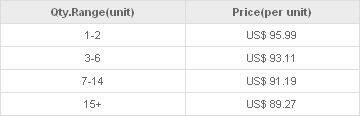
Different products have different savings, but one thing is the same: the more you order, the more you save!
3) For Huge Quantity Orders there may be even bigger savings! To see if the item and order quantity you want qualifies for a special discount, contact one of our sales staff in LiveChat.
4) Order a print catalog from us so you can have your own easy-reference hard-copy of our inventory. To get the latest LightInTheBox catalog, contact our sales staff for more details.
Email:sales@lightinthebox.com
- Diese Seite war: Behilflich | Nicht behilflich
- keine letzte Seite
- Was bedeutet me...